正 · FEATURES
PDF & Export
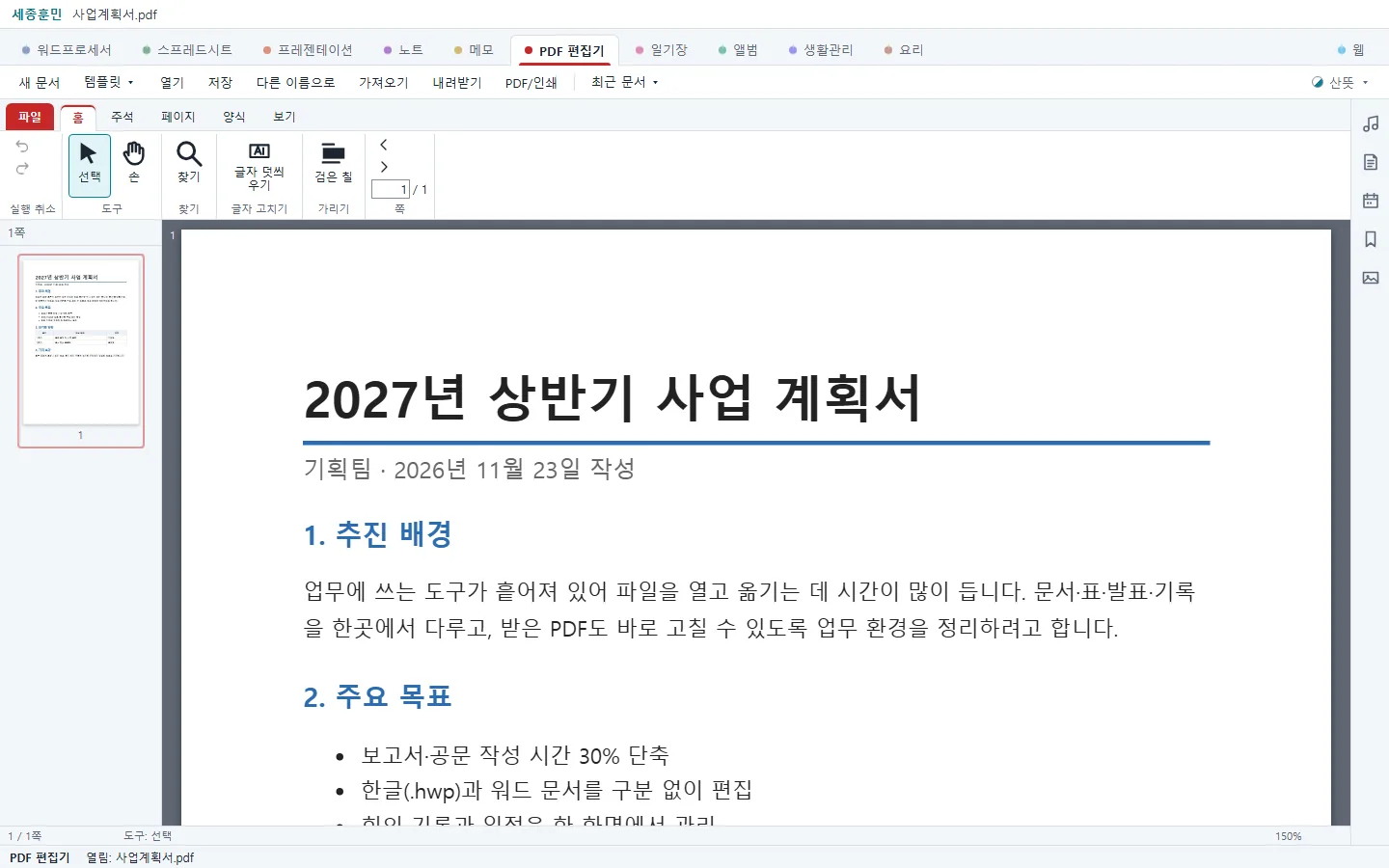
Open a PDF to edit text and images, then export to Word (.docx) or images (.png). 正 means “correct”: check pages in print preview and save a PDF that looks right.

Tools inside
PDF Editor
View, mark up, rearrange and export
- Page thumbnails, zoom, text search, text selection and copy
- Highlight, underline, strikethrough, notes, pen, shapes, text boxes, stamps and signatures
- Rotate, delete and reorder pages, insert blank pages, merge PDFs and split by page range
- Fill form fields, overlay text, and black out areas (the hidden text is removed too)
- Open password-protected PDFs (saving produces an unprotected PDF) and save as standard annotations that other viewers can see
- Export to PDF, DOCX and PNG
Use it when…
- You must add to or fix a received PDF
- You want to turn a PDF into an editable Word file
- You want to check page breaks before printing
How it works
- Open a PDF; it opens directly in the PDF editor tab.
- Edit text and images and tidy the pages.
- Download as PDF, DOCX or PNG, or review in print preview.
See the difference
BEFORE
Opening a separate paid app just to fix one PDF.
AFTER
Fix it in the PDF editor tab and export to DOCX.